Scripts Assets
Discover 641 premium FiveM scripts scripts, MLOs, and resources. All verified and linked to official Tebex stores.
Showing 36 of 641 products
View in Explore open_in_new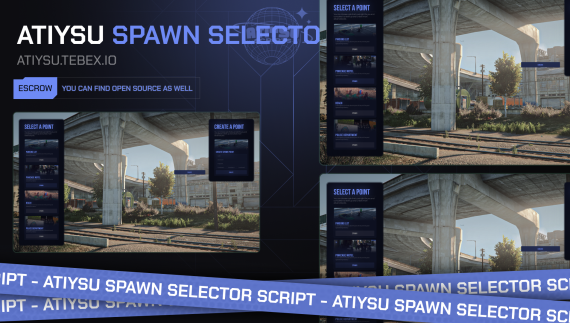
Spawn Selector FiveM Tebex Script | Premium RP System
Spawn Selector FiveM Tebex script with custom spawn points, smooth UI, optimized performance, easy setup, and full open source access. FiveM Tebex Store - Enhance Your Server with the Spawn Selector System! Transform your FiveM server with the Spawn Selector System, now available on the Tebex Store! This powerful script allows you to create custom spawn points, display players' last seen locations, and integrate seamlessly with qb-apartments, enhancing both player interaction and server functionality. FEATURES Create Custom Spawn Points: Set up and manage custom spawn points to improve player experience and tailor starting locations to suit your server's needs. Last Seen Location Display: Show players their last known location upon spawning, ensuring continuity and a smooth transition when re-entering the game. Supports qb-apartments: Fully compatible with qb-apartments framework, integrating seamlessly with your existing server setup. Easily Configurable: Configure and manage spawn points effortlessly with an intuitive, easy-to-use interface. Responsive UI: Enjoy a user-friendly interface that simplifies spawn point management for server administrators. The FiveM Spawn Selector System is designed to optimize player interaction and enhance the overall functionality of your FiveM server. Get started today on the Tebex Store!
by atydevelopment
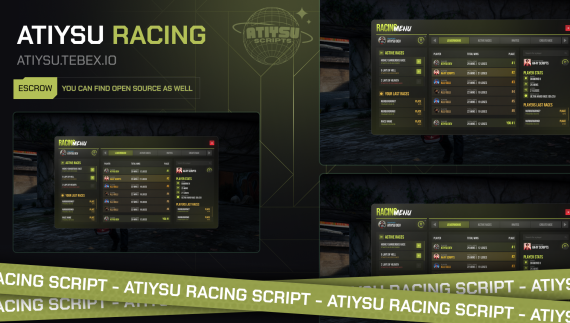
Racing FiveM Tebex Script | Premium Race System
Racing FiveM Tebex script with customizable race tracks, lap timing, competitive events, optimized performance, easy setup, and full open source access. FiveM Tebex Store - Rev Up Your Server with the Racing System! Unleash thrilling competition on your FiveM server with our dynamic Racing System, now available on the Tebex Store! This script allows players to create and join races, climb the leaderboard, and earn rewards, all while enjoying a smooth and responsive user interface. FEATURES Create and Join Races: Players can create their own races or join those created by others, enhancing competition and excitement on your server. Race for Top of the Leaderboard: Compete for the top spots on the leaderboard, adding a competitive edge and motivating players to improve their performance. Gain Ranks and Levels: Earn ranks and levels through race participation, creating a rewarding progression system that keeps players engaged. Win Money from Races: Reward players with monetary prizes based on their race performance, adding a financial incentive to participate in races. Responsive UI: The intuitive interface makes it easy for players and administrators to manage races and track progress effortlessly. Optimized Performance: Designed for smooth, lag-free racing, even with large groups of participants, ensuring a seamless experience for all players. Easily Configurable: Customize and manage race settings to match your server's specific needs with ease, thanks to the flexible configuration options. Our FiveM Racing System is crafted to provide a thrilling, competitive experience for your FiveM server. Get started today on the Tebex Store and bring high-speed excitement to your community!
by atydevelopment
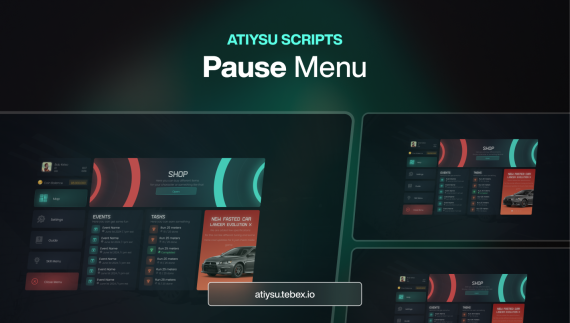
Pause Menu FiveM Tebex Script | Premium RP UI
Pause Menu FiveM Tebex script with modern UI, smooth navigation, customizable tabs, optimized performance, easy setup, and full open source access. Fivem Tebex Store - Enhance Your Players Interactions! Enhance your FiveM server experience with the sleek and FiveM Pause Menu Script, now available on the Tebex Store! This modern and fully customizable menu system improves player interaction, accessibility, and overall navigation, making it a must-have for any server. FEATURES Quick Map & Settings Access: Streamline gameplay with instant access to the in-game map and server settings via the pause menu. Customizable Buttons: Add tailored buttons to link shops, features, or additional menus for a personalized server experience. Integrated Guides Page: Help players navigate with in-menu guides for server rules, tips, or feature instructions. Event & Task Notifications: Keep players engaged with updates on ongoing events or tasks directly in the menu. Announcements Display: Show server-wide updates and news prominently on the pause menu screen. Player Info Display: Provide easy access to player stats like money, name, and server ID for quick reference. Easy Game Exit: Offer a hassle-free way to exit the game with a dedicated button in the menu. The FiveM Pause Menu Script enhances user experience, making it a valuable addition for any FiveM shop. Available now on the Tebex Store, elevate your server today with this essential tool!
by atydevelopment
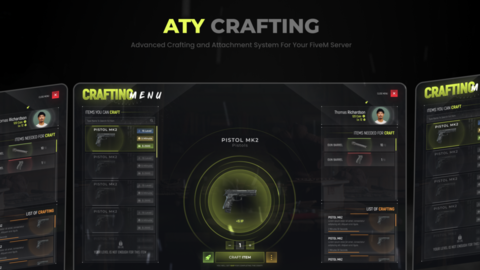
Crafting FiveM Tebex Script | RP Crafting System
Crafting FiveM Tebex script with interactive item crafting, resource management, optimized performance, easy setup, and full open source access. FiveM Tebex Store - Enhance Gameplay with Crafting and Attachments! Enhance gameplay on your FiveM server with the Crafting and Attachment System, now available on the Tebex Store! This comprehensive system lets players craft, customize, and enhance their weapons with a variety of attachments, adding depth and excitement to your server. FEATURES Create Job-Based or Open Crafting Tables: Set up crafting tables that are job-specific or accessible to all players, giving flexibility in how crafting is handled on your server. Queue Visibility During Crafting: Players can track their progress with real-time queue visibility, ensuring they know exactly when their crafting will be completed. Boosting System: Allow players to speed up their crafting process by purchasing boosts via Tebex, adding an extra layer of player engagement and monetization. Easily Add New Crafting Tables: As your server evolves, you can easily add new crafting tables and expand your crafting opportunities without hassle. Attachment System for Guns: Enhance weapons by adding various attachments that modify weapon performance and allow for personalization. Highly Optimized: Our system is optimized for performance, ensuring smooth crafting and weapon customization even with a large number of players. Our FiveM Crafting and Attachment System is designed to enrich player experiences and offer deep customization options. Get started today on the Tebex Store and enhance your server's crafting and weaponry experience!
by atydevelopment
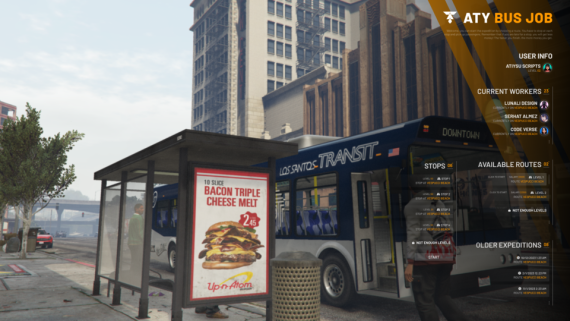
Bus Job FiveM Tebex Script | RP Job System
Bus Job FiveM Tebex script with interactive routes, passenger system, optimized performance, easy setup, and full open source access. Take your FiveM server’s role-playing experience to new heights with our dynamic Bus Job Script, now available on the Tebex Store! This feature-packed script allows players to compete for the top spot on the leaderboard, earn levels to unlock new routes, and interact with NPCs in real-time. [FEATURES] FiveM Bus Job Script Enhance your FiveM server with our advanced Bus Job Script, designed to provide an immersive and competitive bus driving experience: Compete on the Leaderboard: Challenge other drivers and strive for the top position on the leaderboard. This competitive feature motivates players to excel in their bus driving skills and climb the ranks. Earn Levels and Unlock Routes: Progress through levels to unlock additional routes. This system encourages players to advance and explore new areas, enriching their bus driving career. See Other Drivers on the Road: View other bus drivers currently on the road. This feature adds a layer of realism and interaction, allowing players to experience a vibrant and active transportation network. Real-Time NPC Interaction: Engage with NPCs in real-time during your bus routes. This feature enhances the role-playing experience by providing dynamic interactions with passengers and other characters. Easily Create More Routes: Expand the bus network effortlessly by creating new routes. The script’s easy configuration allows you to add and manage routes to keep the gameplay fresh and engaging. Highly Optimized: Our script is optimized for performance, ensuring smooth and efficient operation even with multiple drivers and real-time interactions. Our FiveM Bus Job Script is crafted to offer a rich and engaging bus driving experience, featuring competitive gameplay, interactive elements, and easy route management to enhance player immersion on your FiveM server.
by atydevelopment
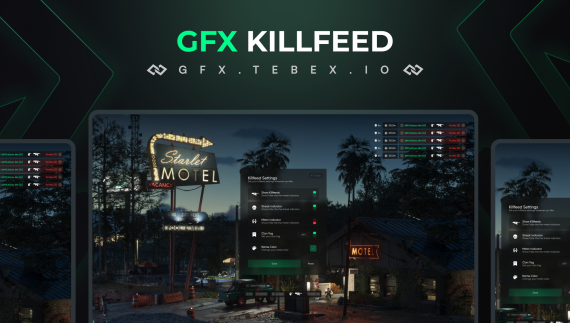
Advanced Killfeed – FiveM RP Script for GTA V
Enhance your GTA V RP server with the Advanced Killfeed for FiveM. Get a custom killfeed system, improve PVP notifications, and create a more immersive roleplay experience. Perfect for FiveM scripts and competitive GTA RP servers. 🔥 FiveM Killfeed Script – Advanced PvP Features & Full Customization Enhance your FiveM PvP server with a smooth, customizable, and feature-rich killfeed system. Designed for competitive gameplay, this script shows who killed who in real time with extra details like kill streaks, distance, and crew tags. Perfect for servers that want a professional, esports-style experience. ⚙️ Key Features 🎯 Killfeed with detailed info – see who killed who instantly 🔥 Kill Streak Counter – track multi-kills and domination streaks 📏 Distance Display – show how far each kill was made 🏷️ Crew Tag Support – works automatically with gfx-crew or via exports 🖱️ Drag & Drop Positioning – place the killfeed anywhere on the screen 🎨 Per-Player Custom Colors – unique styles for different users 🚀 Why Choose This Script? Built for PvP-focused servers where kill tracking is essential Smooth, optimized animations with no FPS impact Fully configurable and easy to integrate into existing HUDs Competitive edge for roleplay, survival, or PvP battle servers ✨ Give your players the best FiveM killfeed experience with streak tracking, crew integration, and full customization.
by gfx development

GFX Deathcam V2 – FiveM PvP Death Replay Script
GFX Deathcam V2, FiveM deathcam script, PvP replay system, player death replay, FiveM kill tracking, RP server deathcam, immersive PvP experience Features • The GFX Deathcam V2 script works seamlessly with all frameworks. • The design of the GFX Deathcam V2 script is inspired by Escape From Tarkov: Arena game. • When a player kills you, it allows you to observe them for a short period. In this observation screen, you can see the player's profile picture, name, the weapon they used, the damage they inflicted on you, the damage you inflicted on them, and the specific regions where the damage to you occurred. • Your body is represented in the observation screen, and the areas where you have taken damage are highlighted in red Requirements • Standalone
by gfx development

GFX Handcuff Script – FiveM Police & RP Arrest System
GFX Handcuff, FiveM arrest script, RP police tools, player detention FiveM, FiveM handcuff system, immersive roleplay arrests, police RP script Features • The script is compatible with all frameworks. (requirement esx-inventory or qb-inventory) • With a handcuff item, it provides the opportunity to handcuff the player in two different ways with different animations. • Using the Headbag, you can restrict the player's vision by putting a bag over their head. • When a player is handcuffed with the electronic handcuff item, the handcuff appears on the player's ankle. The menu designed for the electronic handcuff lists players who are handcuffed with it. In this menu, you can see the players' locations on the live map. With the GPS button, you can mark the player's location on the game's map. You can also give the player a long-lasting shock with the Shock button and release them from the electronic handcuff with the Uncuff button. Requirements • esx-inventory or qb-inventory
by gfx development

GFX Kit Script – FiveM RP Gear & Equipment System
GFX Kit, FiveM gear script, RP equipment management, weapon and gear system, FiveM kit script, immersive RP tools, FiveM loadout management Features Script works with all frameworks. You can easily configure the kit contents and the appearance of the menu through the config settings. The cooldown periods for kits can be customized on a per-kit basis through the config settings. These cooldown durations are stored in the database. You can create kits based on your specific Discord permissions or requirements. Requirements • None (If you want to provide a kit with Discord permission requirements, you will need the Discord-perms script)
by gfx development

GFX LoadingScreen Script – FiveM Custom Load Screens
GFX LoadingScreen, FiveM loading screen script, custom load screens, RP server visuals, FiveM branding, immersive loading screen, server UI enhancements Features This contains a list of actively playing players in the game. Players can listen to music and adjust the music volume on the loading screen. They can switch between the music tracks set by server owners. Updates can be shared through the Config, and these will be listed on the Loading Screen Path Notes page. Game functions for in-game keys can be written in the Config, and these will be listed on the Loading Screen Game Key Infos page. Server owners can configure social media accounts through the Config, and these will be displayed on the Loading Screen Social Media page. Requirements • None (If you are using either the QB or ESX frameworks, player names and surnames will be retrieved and displayed in the player list. )
by gfx development
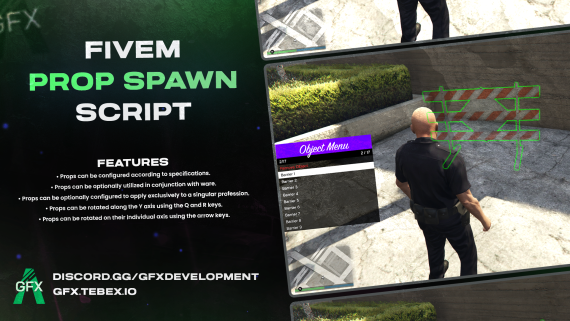
GFX PropSpawner Script – FiveM RP Object & Prop Management
GFX PropSpawner, FiveM prop script, RP object management, spawn props FiveM, roleplay prop system, FiveM RP tools, immersive RP objects Features • Props can be configured according to specifications. • Props can be optionally utilized in conjunction with ware. • Props can be optionally configured to apply exclusively to a singular profession. • Props can be rotated along the Y axis using the Q and R keys. • Props can be rotated on their individual axis using the arrow keys. Requirements • Standalone (If you want to set the props to use the job and the item, your framework must be QB or ESX. If you want to implement them to you server if your framework is not ESX or QB, the necessary files are also unencrypted in the Escrow version.)
by gfx development
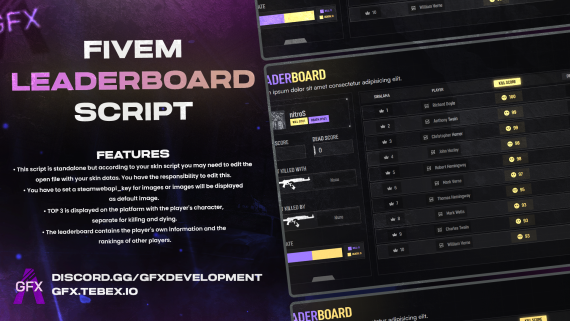
GFX Leaderboard Script – FiveM RP Player Rankings
GFX Leaderboard, FiveM leaderboard script, RP player rankings, player stats tracking, FiveM RP tools, immersive roleplay leaderboard, top players display Features • Leaderboard data is updated instantly in-game. • This script is standalone but according to your skin script you may need to edit the open file with your skin datas. You have the responsibility to edit this. • You have to set a steamwebapi_key for images or images will be displayed as default image. • TOP 3 is displayed on the platform with the player's character, separate for killing and dying. • The leaderboard contains the player's own information and the rankings of other players. Package Contents • gfx-leaderboard • Platform prop showcasing the top 3 players in 4 different colors Requirements • Standalone (This script is standalone but according to your skin script you may need to edit the open file with your skin datas. You have the responsibility to edit this.)
by gfx development

GFX EMP Script – FiveM Vehicle & Electronics Disabler
GFX EMP, FiveM EMP script, vehicle disabler FiveM, electronics disable script, PvP roleplay tools, immersive RP EMP system, FiveM RP mods Features • Standalone • Custom emp ammo prop. • EMP Weapon that ejecting custom emp ammo. If you hit a car with EMP Gun: • You can start and stop the engine. • You can turn on and off the lights of vehicle. • You can lock and unlock the doors of vehicle. • You can broke the engine. • Engine temperature is shown on the menu. • Fuel level shown on the menu. • Speed of the vehicle shown on the menu. And the most important thing is: • You can control (we mean drive) the vehicle from outside of the vehicle through the ui buttons or arrow keys in 100 distance. This content includes • gfx-emp script • EMP ammo prop • EMP gun(weapon_emp) Requirements • No requirement
by gfx development

All In One Script – FiveM Inventory, Profile & Leaderboard
All In One script, FiveM inventory script, player profile system, FiveM leaderboard, RP stats tracking, immersive roleplay tools, FiveM RP management Features • Script can work in any server&framework. • Easy configuration files. • Gitbook documentation for installation and developers. Inventory • PVP Inventory For Extinction, Arena, PVP etc. based servers. • You can add different types of inventories. • Quick use slots. (6 pcs) • Weight system. • Protected Inventory, Stash Inventory features. • Fully optimised and tested with 200+ players. • Compatible with other GFX Scripts. Profile • Players can see their overall stats. • Invenotry is a dependency for profile page. • This is not a script itself, this is an option for inventory. • You can add different types of stats from config. Leaderboard • Fully configurable player leaderboard. • Profile page is a dependency for leaderboard. • This is not a script itself, this is an option for inventory and profile. • You can see different leaderboard types like kills, deaths etc. GFX Development discord.gg/gfxdevelopment
by gfx development

All In One Leaderboard – FiveM RP Player Rankings
All In One Leaderboard, FiveM leaderboard script, RP player rankings, player stats tracking, FiveM RP tools, immersive RP leaderboard, top players display Contains only the Open src Leaderboard Tab. Leaderboard • Fully configurable player leaderboard. • Profile page is a dependency for leaderboard. • This is not a script itself, this is an option for inventory and profile. • You can see different leaderboard types like kills, deaths etc. GFX Development discord.gg/gfxdevelopment
by gfx development

GFX Trad Script – FiveM RP Trading & Item Exchange
GFX Trad, FiveM trading script, RP item exchange, player trade system, immersive RP trading, gear exchange FiveM, roleplay trading tools Features • Compatible with esx qb or gfx-inventory • You can trade with players by sending them a trade request. • On the Trade screen, you can see the weights and item counts, as well as the items of the players on the other side. Requirements • qb or esx or gfx-inventory
by gfx development

GFX Garage Script – FiveM RP Vehicle Storage & Management
GFX Garage, FiveM garage script, RP vehicle storage, vehicle management FiveM, player garage system, immersive RP vehicles, FiveM roleplay garage Features • You can easily configuure the script via config. • Modern UI and design. • Automobile, boat, aircraft and job garages. • Automobile, boat and aircraft impounds. • Job vehicles does not belong to player. • Compatible with qb and esx. Requirements • qb-core or es_extended • You have to add the vehicle images by yourself.
by gfx development

Squad System Script – FiveM RP Team & Squad Management
Squad System, FiveM squad script, team management FiveM, squad coordination, RP squad system, FiveM RP tools, immersive RP team management Features • Standalone (Works with every frameworks) • Players can create squads. (Max 4 member for each squad) • Friendly fire between squad members is configurable. • Squad owner can set the squad as private or public • Squad members can see their health and armor info on their head and the squad hud. • Squad hud can be closed by player as an option. • (Configurable) Squad members can see each other on map as a player blip. Also blip has vision direction. Requirements • There are no requirements.
by gfx development
Advanced Killfeed Script – FiveM PvP Kill Tracking
Enhance your FiveM server with Advanced Killfeed. Track kills, display PvP stats, and improve roleplay with a dynamic and immersive killfeed system. 🔥 FiveM Killfeed Script – Advanced PvP Features & Full Customization Enhance your FiveM PvP server with a smooth, customizable, and feature-rich killfeed system. Designed for competitive gameplay, this script shows who killed who in real time with extra details like kill streaks, distance, and crew tags. Perfect for servers that want a professional, esports-style experience. ⚙️ Key Features 🎯 Killfeed with detailed info – see who killed who instantly 🔥 Kill Streak Counter – track multi-kills and domination streaks 📏 Distance Display – show how far each kill was made 🏷️ Crew Tag Support – works automatically with gfx-crew or via exports 🖱️ Drag & Drop Positioning – place the killfeed anywhere on the screen 🎨 Per-Player Custom Colors – unique styles for different users 🚀 Why Choose This Script? Built for PvP-focused servers where kill tracking is essential Smooth, optimized animations with no FPS impact Fully configurable and easy to integrate into existing HUDs Competitive edge for roleplay, survival, or PvP battle servers
by gfx development

GFX DUI Radio Script – FiveM RP Police Communication
GFX DUI Radio Script, FiveM police radio, RP communication script, DUI event management, immersive RP police tools, FiveM roleplay radio, police RP enhancements GFX DUI Radio Script - Immersive Radio System for Your FiveM Server! 🚀 Introducing the GFX DUI Radio Script Enhance your FiveM server with the GFX DUI Radio Script, a standalone solution that brings advanced functionality and immersive interactions to your server. Designed for seamless integration, this script is fully compatible with pma-voice and provides players with an interactive, intuitive radio experience. 🔥 Key Features of GFX DUI Radio Script 🎧 Prop-Based Interaction Players can interact with a prop to access radio functionalities, making channel management easy and engaging. Join Radio Channels: Connect to specific channels effortlessly using the dynamic user interface. Make Adjustments: Players can fine-tune their radio settings directly through the script. 🔄 Fully Customizable Exports Add any export you like to GFX DUI Radio Script, giving you full control over how it integrates with your server. 🔊 pma-voice Compatibility Works seamlessly with pma-voice, ensuring a smooth experience for players who rely on in-game communication. 🎥 Watch the Demo Video See the GFX DUI Radio Script in action! Our demo video provides a detailed look at how the system works and the features it offers to players. 📌 Why Choose GFX DUI Radio Script? Standalone Design: No dependencies on other scripts for core functionality. Customizable: Easily adapt the script to suit your server's unique needs. Player-Focused: Intuitive interactions and features designed to enhance the player experience. 🛒 Get Your Script Today! Available now on the GFX Store, the GFX DUI Radio Script is the ultimate tool for a professional, immersive radio system. 👉 Upgrade your server with the GFX DUI Radio Script – communication made smarter, easier, and more interactive! 🎮
by gfx development

GFX Advanced Attachment Script for FiveM – Custom Weapons & Gear Enhancements
Enhance your FiveM RP server with the GFX Advanced Attachment Script, allowing full weapon and gear customization for a realistic roleplay experience. Add scopes, silencers, extended magazines, and more to your weapons with ease. Perfect for FiveM servers, this advanced attachment system improves gameplay immersion, giving players professional-level weapon modifications and realistic RP mechanics. Upgrade your FiveM experience today with the GFX Advanced Attachment Script for seamless integration and performance. **GFX FiveM Attachment Script - The Easiest Way to Customize Your Weapons!** With our FiveM Attachment Script developed by GFX, players on your server can quickly and easily add the most suitable attachments to their weapons. This script is fully compatible with ESX and qb-core frameworks, and it can also function independently with GFX Inventory. **Features** * **Wide Compatibility:** Our script supports ESX, qb-core, and GFX Inventory frameworks. * **3D Weapon View:** While adding attachments, players can view a 3D model of the weapon on the right side, making customization more interactive. * **Modern and User-Friendly Interface:** The sleek UI menu makes adding attachments faster and more convenient. * **Flexible Settings:** Easily adjust the locations and numbers of attachment tables in the config file. * **Fully Customizable:** Configure all weapons and attachments through the config file; you can also add new weapons and update attachment images in the config. Requirements • QB or ESX or GFX Inventory
by gfx development

GFX Crafting Script with Level System – FiveM RPG
Features • Compatible with both ESX and QB frameworks. • Easy to configure • Level up and open new craftable items • Job-Based or Universal Crafting Tables: Configure crafting tables that are either exclusive to specific jobs or available to all players, providing flexibility in how you integrate crafting into your game. • Visible Crafting Queue: Players can view a queue to monitor the status and progression of their crafting projects, adding a layer of engagement and planning. • Boosting System: Implement a boosting system where players can purchase time-reduction boosts from Tebex. This feature allows players to expedite the crafting process, enhancing their gameplay experience. • Easily Create New Tables: The system is designed for ease of use, allowing admins to quickly add and configure new crafting tables as the game evolves. • Attachment System: Enhance weapons crafting with an attachment system, enabling players to customize their guns with various attachments that impact gameplay. Requirements • QB or ESX
by gfx development

GFX Secondhand Script – FiveM RP Buy & Sell Items
Features • The script works seamlessly with QB and ESX frameworks. • It is compatible with oxmysql, ghmattimysql, and mysql-async scripts. • You can customize the interact script you want to use via the config file. • Players can put their owned vehicles up for sale at locations specified in your config, at their desired prices. • When players want to purchase a second-hand vehicle, they can pay an extra amount to customize the license plates. You can adjust the amount to be paid or disable this feature if desired. • The payment method for second-hand vehicle purchases can be configured to include bank and cash options. • You can toggle the collision of vehicles listed for sale via the config file. • Locations for vehicle sales can be edited in the config, allowing you to add new areas or duplicate existing ones. • The test drive duration can be adjusted via the config file. Don't forget to watch the promotional video for detailed information. Requirements • QB or ESX
by gfx development

GFX Advanced Interact Script – FiveM RP Interaction System
Features • The GFX Interact script is standalone and works seamlessly with all frameworks. • The GFX Interact script is designed with efficiency in mind, utilizing DrawRect for optimal performance. • Interact options dynamically adjust based on the player's orientation. At a distance, interactions appear compact, expanding as the player approaches. • Upon activation, the menu options seamlessly appear. Navigate through them effortlessly using mouse scroll. Requirements • None
by gfx development

GFX Attachment Script – FiveM Weapon & Gear Customization
Features • The script is compatible with ESX and QB frameworks. (For customers using a different inventory system, we will assist with adaptation through support requests.) • It features a weapon attachment menu supported by 3D weapon models. • Weapons and additional attachments can be easily edited through the configuration file (A screenshot of the configuration file is available in the cfx.re topic.) Requirements • QBcore or ESX (For customers using a different inventory system, we will assist with adaptation through support requests.)
by gfx development
GFX Handcuff Script – FiveM Police & RP Arrest System
Features • The script is compatible with all frameworks. (requirement esx-inventory or qb-inventory) • With a handcuff item, it provides the opportunity to handcuff the player in two different ways with different animations. • Using the Headbag, you can restrict the player's vision by putting a bag over their head. • When a player is handcuffed with the electronic handcuff item, the handcuff appears on the player's ankle. The menu designed for the electronic handcuff lists players who are handcuffed with it. In this menu, you can see the players' locations on the live map. With the GPS button, you can mark the player's location on the game's map. You can also give the player a long-lasting shock with the Shock button and release them from the electronic handcuff with the Uncuff button. Requirements • esx-inventory or qb-inventory
by gfx development

GFX GunMenu Script – FiveM Weapon Selection & Management
Features A FiveM weapon shop inspired by Counter-Strike 2! Menu colors can be easily edited from the files, just like in CS2. The contents and prices of the gun shop can be easily configured through the config. Weapons purchased from the gun shop can be set as items or directly given to the character's hand through the config. Requirements • None (If you configure it to give items through the config, you should use either ESX or QB frameworks.)
by gfx development
GFX Kit Script – FiveM RP Gear & Equipment System
Features Script works with all frameworks. You can easily configure the kit contents and the appearance of the menu through the config settings. The cooldown periods for kits can be customized on a per-kit basis through the config settings. These cooldown durations are stored in the database. You can create kits based on your specific Discord permissions or requirements. Requirements • None (If you want to provide a kit with Discord permission requirements, you will need the Discord-perms script)
by gfx development

GFX MDT Script – FiveM Police & RP Case Management
Presenting the Exciting New GFX MDT System! Hello cherished community members, We're absolutely thrilled to introduce the dynamic GFX MDT system to all of you! The GFX Team has poured their heart and soul into crafting a top-notch MDT system that's here to serve you remarkably well. Get ready, because we're gearing up to reveal all the exciting details about this in this discussion. And guess what? Our excitement knows no bounds as we're already hard at work, brewing up some fresh updates for the MDT system! You can explore the majority of GFX MDT's features on the dedicated website we have meticulously designed for your convenience. Through this platform, you can engage with the live tablet interface and gain insights into its functionalities before making a purchase decision. LIVE MDT WEBSITE Gitbook Docs Link Features Homepage "General Information": This section presents comprehensive crime rate statistics. You can access daily and cumulative records for created incidents and wanted individuals. "Hot Wanted List": Within this section, you will find the list citizens whose call records have been created in the last three days. "On Duty List": This segment offers detailed profiles of officers currently on duty, along with their real-time locations displayed on the live map. Search Bar The search bar facilitates a variety of queries. Users can conduct searches for individuals, vehicles, and records within the tablet interface. User: Upon searching for a specific user and accessing their profile, you can view the licenses they hold and update any pertinent evidence related to that individual. Records Under the "Record List" section, officers have the ability to generate incident records. These records include information about the responsible officer and allow for the addition of suspects, involved officers, and associated evidence. Wanteds In the "Wanted List" area, officers can register wanted suspects, input relevant evidence, draft detailed reports, and assign designations such as "Robber" or "Murderer" to the suspects. Fines Within the "Fines List" section, officers can input potential offenses, specifying the offense title and corresponding penalty. Subsequent updates to these offenses can also be made. Note that only officers above a certain rank possess the authority to make such updates and additions. Department The "Department" section encompasses active departments, with their respective details on display. Individuals barred from entering specific departments can be registered within this section. Live Map The "Live Map" section provides an instantaneous visual representation of officers currently on duty, their locations depicted in real-time on the map. Requirements •ESX or QB Additional Information As this package is currently under development, it may differ from the content in its description. These differences are more advanced or reorganized versions of the features. Some of the features included in the package may have usage differences between servers. No open source files of the package are for sale and there is no reseller other than GFX Store. The package is protected by the DMCA. We do not accept returns on purchased packages if the package is functional or if the existing error is a user-induced problem. Click here to read the detailed return policy of GFX Store and Tebex.
by gfx development
GFX PropSpawner Script – FiveM RP Object & Prop Management
Features • Props can be configured according to specifications. • Props can be optionally utilized in conjunction with ware. • Props can be optionally configured to apply exclusively to a singular profession. • Props can be rotated along the Y axis using the Q and R keys. • Props can be rotated on their individual axis using the arrow keys. Requirements • Standalone (If you want to set the props to use the job and the item, your framework must be QB or ESX. If you want to implement them to you server if your framework is not ESX or QB, the necessary files are also unencrypted in the Escrow version.)
by gfx development
GFX Leaderboard Script – FiveM RP Player Rankings
Features • Leaderboard data is updated instantly in-game. • This script is standalone but according to your skin script you may need to edit the open file with your skin datas. You have the responsibility to edit this. • You have to set a steamwebapi_key for images or images will be displayed as default image. • TOP 3 is displayed on the platform with the player's character, separate for killing and dying. • The leaderboard contains the player's own information and the rankings of other players. Package Contents • gfx-leaderboard • Platform prop showcasing the top 3 players in 4 different colors Requirements • Standalone (This script is standalone but according to your skin script you may need to edit the open file with your skin datas. You have the responsibility to edit this.)
by gfx development
GFX EMP Script – FiveM Vehicle & Electronics Disabler
Features • Standalone • Custom emp ammo prop. • EMP Weapon that ejecting custom emp ammo. If you hit a car with EMP Gun: • You can start and stop the engine. • You can turn on and off the lights of vehicle. • You can lock and unlock the doors of vehicle. • You can broke the engine. • Engine temperature is shown on the menu. • Fuel level shown on the menu. • Speed of the vehicle shown on the menu. And the most important thing is: • You can control (we mean drive) the vehicle from outside of the vehicle through the ui buttons or arrow keys in 100 distance. This content includes • gfx-emp script • EMP ammo prop • EMP gun(weapon_emp) Requirements
by gfx development

GFX Marker Script – FiveM RP Map & Interaction Markers
Features If you open the marker menu with the button you set on the config and hover the mouse over the marker you want and close the menu, you will have a marker. You can add new markers with the help of the ytd file and config file in the script. There are 6 markers preset. you can add new markers, up to 9 markers can be added. Requirements • You must have a squad or team system and you need to connect the marker system to your squad system.
by gfx development

GFX Racing Script – FiveM PvP & Roleplay Racing System
Description: Looking for a powerful FiveM racing script to enhance your server's experience? This script is packed with essential features like live map route creation, a real-time racing HUD, and an interactive race betting system. Whether you’re managing events or participating in races, this script offers seamless integration with ESX and QB Framework, making it a perfect fit for any FiveM server looking to add competitive racing dynamics. Features: Live Map Route Creation: Create custom routes directly on the live map and manage saved routes from the menu for future races. Active Race Display: View and track all ongoing races in real-time on the live map. Race Betting System: Bet on racers and events with a fully integrated betting system that tracks odds and potential winnings. Racer HUD: Racers can monitor their performance and position with a sleek racing HUD that updates during the race. Requirements: Supports both ESX and QB Framework.
by gfx development

GFX Deathcam Script – FiveM PvP Player Death Replay
Features • Script works with all frameworks. • The killed player can watch the player who kills and see their information on the screen. • This information includes the steam or discord picture of the player who killed the player, the player's name, how much damage the player did in how many hits, health armor and the name of the weapon that killed the player. • How long Deathcam is displayed can be set in the config file. • How long the displayed hits are recorded can be set in the config file. Requirements • None
by gfx development

GFX Open Src PVP Bundle - 30% Off!
This exclusive package features 18 high-quality GFX PVP scripts, all available in their Open Source versions. As an added bonus, you’ll also receive a 50% discount code for our popular Inventory V2 Profile and Leaderboard pages. What’s Inside: GFX Help GFX Chat GFX Squad GFX Shop GFX Inventory V2 GFX Lootbag GFX Vehicle Items GFX Redzone GFX Effect GFX Marker GFX Hitmarker GFX Leaderboard GFX Kit GFX Arena GFX Crew GFX Tebex shop GFX Deathcam V2 GFX Safezone This bundle offers everything you need to create an immersive and competitive experience for your community. With open-source flexibility and a massive discount on the Inventory V2 Profile and Leaderboard, it’s the perfect way to take your server to the next level.
by gfx development